Author Archives: brianna

TEN TECH TREATS FOR THE HOLIDAYS

TEN TECH TREATS FOR THE HOLIDAYS


Call me biased, but Apple has created some insanely great technology products this year which is one of the reasons they’re responsible for 7 out of the 10 mentioned in this article. Sonos still gets my vote for the best and easiest to setup WiFi home theatre and music system and the latest Sony OLED flatscreen television is simply stunning. Open up your checkbooks and dive in.

Apple TV 4K

The new Apple TV 4K launched in September offers some new features that elevate it to the best television and app streaming device on the market. First of all, it now plays movies and TV shows at 4K Ultra HD resolution with Dolby Vision and HDR10 allowing brighter highlights and expanded range of colors on TVs that also have HDR. The new A10X Fusion processor (same CPU as the iPad Pro) and 3GB RAM provides twice the performance of the previous model which translates into better streaming and gaming performance. News and sports live streaming is now available with NBA, MLB, Bloomberg TV. Rumors that Amazon Prime Video would be available this fall are still lingering, but nothing yet. The base model 32GB model is $179 and the 64GB model is $199.

iPhone 8

The iPhone 8 (4.7”) and 8+ (5.5”) and the iPhone X (5.8”) were announced this summer and began shipping in September. The iPhone 8 models include an A11 Bionic chip with 64-bit architecture with an embedded M11 motion coprocessor, 12MP camera, optical image stabilization, six-element lens, quad-LED TrueTone flash, autofocus, Live Photos mode with stabilization, body and face detection, 4K video recording at 24, 30 or 60 fps, slo-mo and time-lapse video with continuous autofocus, 7MP FaceTime camera with 1080p hd video recording and a fingerprint sensor built into the Home button. 

In addition, the larger iPhone 8+ model includes 12MP wide-angle and telephoto cameras, optical zoom and digital zoom up to 10x and portrait mode capability. 

For those seeking to upgrade their existing iPhone 6 +, 6s+ or 7+, the new iPhone 8+ feels and works the same as your old phone and retains the Home button feature. Both are available in gold, silver and space gray with the 64GB model priced at $699 and the 256GB model at $799.

iPhone X

iPhone X (pronounced “ten”) marks the tenth anniversary of Apple’s iPhone. It also rebrands the iPhone with the letter X in much the same way that Mac OS X rebranded their operating systems. Apple has been quietly rethinking, or “Thinking Different”) over the past few years with their naming conventions with the iPad, MacBook and iMac. Will there ever be an iPhone 9? I don’t think so, just as there will never be a Windows 9. So now it’s letters over numbers. So, thanks Apple for confusing us even more. I’m sure we’ll get over it.

The iPhone X introduces new technologies and features into their tenth anniversary addition that insanely great. It now features a Super Retina HD 5.8” OLED Multi-Touch display and a fingerprint resistant oleophobic coating with FaceID facial recognition (which eliminates the TouchID Home button). Technical features include; A11 Bionic chip with 64-bit architecture, neural engine, embedded M11 motion coprocessor, 12MP wide-angle and telephoto cameras, optical and digital zoom up to 10x, portrait mode, dual optical image stabilization, six-element lens, quad-LED True Tone flash, Panorama (up to 63 MP), sapphire crystal lens cover, hybrid IR filter, 4K video at 24, 30 or 60 fps, slo-mo and time-lapse video, front facing True-Depth 7MP camera with Portrait mode, Retina Flash, auto HDR with body and face detection. It is available in space gray and silver and weighs in at 6.14 ounces (about one ounce less than the iPhone 8+). For those who desire the latest technology and are willing to learn how to use it, this is the best smartphone on the market today. The 64GB model is $999 and the 256 GB is $1149. In the last ten years, Apple has successfully transitioned us from buying a laptop to a smartphone for roughly the same amount.

AirPods

For all of you who spend five minutes untangling your iPhone headphones after pulling them out of your pocket, a simple, yet expensive solution has arrived. The new AirPods are lightweight, wireless headphones that seamlessly pair with your iPhone and iCloud synced devices (iPads, iMacs, MacBooks). AirPods can also be used with other smartphones and Bluetooth devices through normal pairing procedures. They feature dual-microphone and noise-cancelling technology that uses subtle vibrations making it on of the best remote-input devices on the market.

When you are listening to music through your AirPods and remove one of them from your ear, an optical sensor pauses the music and then resumes when it is placed back in your ear. To actuate Siri, just double-tap either AirPod and you can perform tasks (text message, email, directions, etc.) and she will reply clearly into your ear. 

The white plastic case fully charges the AirPods in 3 hours which provides 5 hours of use per AirPod. In addition, the case holds enough battery to recharge them for 24 more hours. The case weighs 1.34 ounces (38 grams) and each AirPod is .14 ounces (4 grams). At $159 their pricing is inline with offerings from other wireless headphone manufacturers.

Apple HomePod

The HomePod includes an A8 chip, six-microphone array, seven horn-loaded tweeters array, high-excursion woofer and internal low-frequency calibration microphone (automatic bass correction) surrounded by a seamless mesh fabric. It uses an advanced algorithm that continuously analyzes the music and dynamically tunes the low frequencies for smooth, distortion-free sound. The beam forming tweeters precisely focus the sound from narrow beams all the way to true, consistent 360 degree audio, creating an immersive sense of space no matter where the HomePod is placed. The Apple-designed A8 chip provides real-time modeling of the woofer mechanics and buffering that’s even faster than real time. Through advanced echo cancellation and beamforming technology, the upmixing of direct and ambient audio allow the microphone to hear you over the music. With a seamless connection to Apple Music, you can now access 40 million songs with a simple voice command. HomePod does more than play music. It is also a hub for controlling your smart home accessories, from lights to thermostats to door locks. Weighing in at 5.5 lbs and 6.8 inches high, it is offered in white or space gray at $349.

iMac Pro

The long-awaited 27” iMac Pro with 5K display (available in December) has an 8-core CPU with 32GB of DDR4 ECC RAM memory, 1TB SSD, Radeon Pro Vega 56 graphics processor with 8GB of HBM2 memory, 1080p FaceTime camera, 4 USB-C/Thunderbolt 3 ports, 3 USB 3 ports, SDXC card slot, 10 Gigabit Ethernet port, built-in stereo speakers, 4 microphones and a 3.5 mm headphone jack. The included wireless Magic Keyboard with Numeric Keypad and Magic Mouse 2 are included in the $5000 baseline price. The base model iMac Pro can be upgraded with an 18-core 4.5GHz turbo-boosted Xeon processor ($4000), 16GB High-Bandwidth Radeon Pro Vega graphics card ($2000), 128GB 2666 MHz DDR4 ECC RAM ($2700) and 4TB all-flash SSD storage ($3600) for a grand total of $17,299, a small price to pay for the fastest consumer computer on the planet.

Amazon Echo

The all-new second generation Echo has a new speaker, new design and more fabric and wood veneer styles. It connects to Amazon Music, Spotify Pandora, audiobooks, radio stations and news briefs. With multi-room music capability, you can stream music in different rooms with compatible Echo devices. With hands-free calling and messaging, you can reach anyone instantly with just your voice (Alexa, call the cops). Through Alexa, the voice-activated smart assistant, you can check your calendar, weather, traffic and control your compatible smart lights, thermostats, garage doors, sprinklers and more. The Echo family includes the Echo Dot ($50), Echo ($100), Echo Plus ($150), Echo Spot ($130) and the Echo Show ($230).

Google Home

By saying, “Hey Google” you can ask any question or request an action and Google Home searches the internet for the answer. It also works with Chromecast to stream TV shows, movies and music on your smart television or speakers. Supported apps include Nest, wemo, Philips Hue, August, Leviton, LG, Lutron, iHome, Hive, Honeywell, Frigidaire, Ring, Smartica and tp-link. Streaming services include Netflix, HBO Now, Spotify, Pandora, YouTube Music and Google Play. The Google Home weighs in at 1.05 lbs and is 5.62 inches high and is offered in white and slate fabric for $129. Google Home Mini ($49) and Google Home Max ($399) offer the same features in a smaller or bigger size.

Sonos

Sonos single-handedly created the most convenient wireless multi-room sound systems available on the market today. The Sonos app is simple to setup and use, and a long list of streaming services like Apple Music, Amazon Music, Mixcloud, Napster, Pandora, SiriusXM and Spotify provide continuous streaming music throughout your home. It can even connect to your existing stereo to control previously built-in speakers and components. The product line includes the One Smart Speaker with built-in Amazon Alexa ($199), Play:1 ($199), Play:3 ($299), Play:5 ($499), PlayBase ($699), PlayBar ($699), Sub ($699), Connect ($349), Connect:Amp ($499) and Boost WiFi ($99). 

Sony OLED

Sony’s stunning OLED television (Model KD-55A1) OLED technology, originally pioneered by LG, creates really deep blacks and excellent contrast because every single pixel emits its own light. It uses LG’s OLED technology and improves the motion processing and contrast enhancement. It is 48” wide, 28” high and 3.5” thick and weighs 55 lbs. 

Currently retailing for $3499 but on sale at several retailers in the $2500 range. The best time to by a new Smart TV is in the middle of January after the Consumer Electronics Show in Las Vegas when new models are introduced and the previous year’s model gets a significant price cut.

Next issue we’ll be visiting the exciting and surprising world of online dating, so go out and buy some of this new technology to improve your odds.

BITCOIN ARTICLE

BITCOIN ARTICLE


Watching Bitcoin’s price is like watching the latest high tech IPO stock price or a good run at the Black Jack tables in Vegas. It’s exhilarating while it’s going up, but there can be wild fluctuations along the way. Today, one bitcoin is hovering around $4400 based on the current supply of 16,546,138 bitcoins with a market cap of $72.8 billion (www.coindesk.com). In comparison, one bitcoin in July 2010 was $7.


What is Bitcoin?

Bitcoin is a bank-free, decentralized, internet currency whose concept was introduced to the world by a programmer called Satoshi Nakamoto (his true identity remains hidden) late 2008, a short time after Lehman Brothers filed for the largest bankruptcy in U.S. history. The first Bitcoin, also known as the “Genesis Block” was mined on January 3, 2009. It contained the text, “The Times 03/Jan/2009 Chancellor on brink of second bailout for banks”, perhaps as a relevant political commentary.


Bitcoin is also a digital currency with code and rules that are open source, and therefore, not controlled by one person, company, bank or country. The total number of bitcoins was defined in the public ledger back in 2009 and because it’s a public ledger, everyone can see everyone else’s bitcoins to make sure that no one cheats or makes extra copies. Because it isn’t regulated, there is no interest rate or exchange fees and its value cannot be diluted by any government that may want to release its own bitcoins. Confused? Hang in there, it’s about to get more interesting.


Acquiring Bitcoins?

The first way to acquire bitcoins is to buy one through many of the online Bitcoin exchanges like Mt. Gox, Bitcoin’s largest exchange which handles 80% of Bitcoin trade. This requires a Bitcoin wallet installed on your computer or smartphone. After you install a Bitcoin wallet, you receive an encrypted address, secured by Blockchain protocol, that can be shared with anyone who wants to send or receive payment in the form of bitcoins. Every transaction ever processed is recorded in the Blockchain public ledger, which prevents counterfeiting, but also makes the details a matter of public record. 


Bitcoin Mining

Bitcoin is underpinned by a peer-to-peer network similar to BitTorrent’s file sharing system. Bitcoins are mathematically generated as computers in this network perform complex number-crunching tasks (bitcoin mining). Several tech companies like AntMiner and Avalon manufacture ASIC computers that are capable of handling the calculations required for bitcoin mining. If you tried to mine bitcoins on your laptop, it would take more than three years to generate any coins, so it’s better to join a mining pool syndicate that splits the group’s mined bitcoins based on the amount of work your computer completed. The bitcoin system was originally created to have an upper limit of 21 million bitcoins, so the mining of bitcoins gets more difficult the closer we approach the ceiling. 


Bitcoin is Volatile

The price of a bitcoin can increase or decrease dramatically based on certain economic, financial or world news. It is a high risk asset and should not be used for savings accounts. In fact, if you can’t afford to lose your nest egg, you shouldn’t store it in bitcoin


Payments are Irreversible

Once a bitcoin payment has been made, it is irreversible and can only be refunded by the recipient of the funds. You should only do bitcoin business with people and companies that you trust.


Bitcoin Anonymity

All bitcoin transactions are stored publicly and permanently on the bitcoin network. The balance and transactions of any bitcoin address can be seen by anyone. The identity of the user behind the address remains anonymous until more information is revealed during the transaction.


Unconfirmed Transactions are not Secure

Transactions are reversible in the confirmation stage (between1-90 minutes) but are irreversible after the confirmation which averages 10 minutes.


Trust Factor

Trust in Bitcoin requires no trust at all. It’s fully open-source and decentralized where all transactions and bitcoins issued into existence can be transparently consulted in real-time by anyone. The whole system is protected by peer-reviewed cryptographic algorithms similar to those used in online banking.


Taxes & Regulations

Bitcoin is not an official currency of any country, however most jurisdictions require payment of income, sales, payroll and capital gains taxes on bitcoin. It is the bitcoin users’ responsibility to contact the state and federal agencies for any taxes due from the sale or trade of bitcoins. In March 2014, the IRS stated that all virtual currencies would be taxed as property rather than currency, and that gains or losses from bitcoins held as capital will be realized as capital gains or losses, while bitcoins held as inventory will incur ordinary gains or losses.


Insurance

Regular checking and savings accounts are insured by the FDIC, however, Bitcoin exchanges and Bitcoin accounts are not insured by any type of private, federal or government program.


Where can you spend them?

Bitcoins can be used at several retailers and websites such as Expedia, CheapAir, Overstock.com, Subway and Whole Foods. For the truly adventurous, Virgin Galactic will even take you into space with Bitcoin. 


Bitcoin intermediate service companies are providing access to most online retailers that don’t typically support Bitcoin. There is typically a small transaction fee to convert your Bitcoin. Until large retailers like Amazon, Apple or BestBuy accept bitcoin directly, services like eGifter, Gyft and Purse.io can be used to gain access to these retailers.


If this Bitcoin phenomenon is still to confusing to comprehend, don’t worry. If you didn’t invest in the early days of its existence, it’s probably too expensive to start now without risk. Although that’s what they said about Apple & Google.

BEWARE MALWARE, RANSOMWARE, AND LOST PASSWORDS

Beware Malware, Ransomware
and Forgotten Passwords

Think twice about 2FA

Internet security threats in the form of malware are increasing daily and becoming more insidious and invasive than ever before. The source of this malicious software can show up on your computer disguised as emails emanating from well-known companies like Adobe, Amazon, Apple, FedEx, Google and Microsoft or appear after selecting click-bait on news sites or social media platforms. In some cases, after clicking on streaming video content (YouTube, Facebook, Vimeo, etc.), you are warned that Adobe FlashPlayer is out of date and you need to update it. 99 times out of 100, this and other well-disguised scams are fraudulent and you should never click on or install the update.

In recent developments, unscrupulous fraudsters utilizing robotic auto-dialers send out warnings via text or voice suggesting that your cloud or email accounts have been hacked requiring you to take immediate action. You are then invited to call their 800 number so that technicians standing by can help you alleviate this non-existent threat by paying a one-time fee that will protect your computer from future outbreaks. Sometimes, the advertisements produced by adware can appear as uncloseable  windows or audible warnings requiring immediate action. When this happens, you should exit or force quit your web browser. In no circumstances should you follow the instructions to call or chat with an online technician.

If you have inadvertently allowed someone to take control of your computer, there is a possibility that ransomware, a dangerous form of malware, could have been covertly installed on your computer by the online technician who is allegedly eradicating viruses from your computer. It’s purpose is to encrypt your data files and render them unreadable until the payment of ransom is collected. Again, never let anyone take over your computer, and do not give out your credit card, passwords or any personal information for any reason.

To combat these cyber threats and to add another layer of security that is nearly impossible to breach, Apple, Facebook, Google, Yahoo and other companies that provide email, cloud and social media accounts have instituted a system called 2-Factor Authentication (2FA). It is designed to ensure that you’re the only one who can access your account, even if someone else knows your password.  With 2FA, your account can only be accessed on devices you trust (iPhone, iPad, computer). When signing in to a new device for the first time, you are required to provide two pieces of information – your password and the six-digit verification code that is sent to your trusted devices.

2FA dramatically improves the security of your accounts and personal information (contacts, calendars, notes) by requiring a separate code, so your password alone is no longer enough to access your accounts. This keeps the hackers out, however, if you do not have access to another trusted device when you are trying to connect or reset a new device, you may experience insurmountable problems, including a locked out account or a phone that becomes inoperable. If you aren’t in the habit of having the second device with you or you can’t remember your password, an alternative option is to turn off 2FA and answer the security questions like “What is the name of your first pet?” or, “What city did your parents meet in?” Just make sure that you have these answers written down or better yet, put them in the Notes section of your Contacts on your passcode protected smartphone.

At caféMac, we spend a third of our time helping clients with their passwords and security issues. If you write down your account names, passwords and answers to your security questions (include the date you created or changed this information), you will save money and time solving these problems.

Security Threats and 2FA

Security Threats & 2FA

Internet security threats in the form of malware are increasing daily and becoming more insidious and invasive than ever before. The source of this malicious software can show up on your computer disguised as emails emanating from well-known companies like Adobe, Amazon, Apple, FedEx, Google and Microsoft or appear after selecting click-bait on news sites or social media platforms. In some cases, after clicking on streaming video content (YouTube, Facebook, Vimeo, etc.), you are warned that Adobe FlashPlayer is out of date and you need to update it. Ninety-nine times out of one hundred, this is fraudulently. If any of these threats occur, DO NOT CLICK OR CALL.

In recent developments, unscrupulous fraudsters utilizing robotic auto-dialers send out warnings via text or voice suggesting that your cloud or email accounts have been hacked requiring you to take immediate action. You are then invited to call their 800 number so that technicians standing by can help you alleviate this non-existent threat by paying a one-time fee that will protect your computer from future outbreaks. Sometimes, the advertisements produced by adware can appear as unclosable windows or audible warnings requiring immediate action. When this happens, you should exit or force quit your web browser. In no circumstances should you follow the instructions to call or chat with an online technician. 

If you have inadvertently allowed someone to take control of your computer, there is a possibility that ransomware, a dangerous form of malware, could have been covertly installed on your computer by the online technician who is allegedly eradicating viruses from your computer. It’s purpose is to encrypt your data files and render them unreadable until the payment of ransom is collected. Again, never let anyone take over your computer, and do not give out your credit card, passwords or any personal information for any reason.

To combat these cyber threats and to add another layer of security that is nearly impossible to breach, Apple, Facebook, Google, Yahoo and other companies that provide email, cloud and social media accounts have instituted a system called 2-Factor Authentication (2FA). It is designed to ensure that you’re the only one who can access your account, even if someone else knows your password.  With 2FA, your account can only be accessed on devices you trust (iPhone, iPad, computer). When signing in to a new device for the first time, you are required to provide two pieces of information – your password and the six-digit verification code that is sent to your trusted devices. 

2FA dramatically improves the security of your accounts and personal information (contacts, calendars, notes) by requiring a separate code, so your password alone is no longer enough to access your accounts. This keeps the hackers out, however, if you do not have access to another trusted device when you are trying to connect or reset a new device, you may experience insurmountable problems, including a locked out account or a phone that becomes inoperable. If you aren’t in the habit of having the second device with you or you can’t remember your password, an alternative option is to turn off 2FA and answer the security questions like “What is the name of your first pet?” or, “What city did your parents meet in?” Just make sure that you have these answers written down or better yet, put them in the Notes section of your Contacts on your passcode protected smartphone. 

At caféMac, we spend a third of our time helping clients with their passwords and security issues. If you write down your account names, passwords and answers to your security questions (include the date you created or changed this information), you will save money and time solving these problems.

– Witty Words of Wisdom from the Wonderful Wizard of Witous

Holiday Tech

Holiday Tech

Sonos – Wireless Speaker System

Sonos smart speakers connect to each other over the existing WiFi network in your home or office. WiFi has greater range and works with multiple devices (iPhones, iPads, computers, Sonos speakers). Sonos allows you to play different music to each speaker or the same music to all speakers (in sync). You control Sonos speakers with the Sonos App on your iPhone, iPad, smartphone, tablet or computer. 

Sonos offers three types of remote speakers. The Play 1 ($199) is a compact, yet powerful bookshelf speaker. The Play 3 ($299) has a deeper bass response than the Play 1 with a room filling power. The Play 5 provides the ultimate listening experience with its pure, deep and vibrant sound. In addition, The Sonos Home Theater product line includes the Playbar ($699), a compact, low-profile speaker system with nine drivers in a 3.35″ x 35.43″ x 5.51″ unit that can sit in front of your TV or mount on the wall. The Sonos Sub ($699) compliments the Playbar and delivers powerful, realistic and room shaking bass in a compact (15.3″ x 15.8″ x 6.2″) enclosure. The entire Sonos product line can be integrated into your existing home sound system and controlled easily with your iPhone or Smart Remote Controller. www.sonos.com

Altwork Station – Ergonomic Workstation 

Designed by a team of experienced technology professionals and manufactured in Sonoma County, the Altwork Station offers a new, ergonomic way for computer users to interact with their computers. 

Utilizing an integrated monitor, desk and chair, the computer screen and keyboard physically move with the angle of the body to conform to the physical limitations of the computer. It can be configured into four productivity positions; sitting, standing, collaborating or in a reclined focus position, including a zero gravity option with the monitor above with a simple push of a button. The Altwork Station is 34 inches wide, 5 feet long and weighs 210 pounds.

The Standard Altwork Station is $5900 and the Signature Altwork Station is $6900. It is available in 540 color and finish options with additional accessories that include a Side Table at $1200, Dual Monitor Mount System at $695 and an Upper Laptop Mount at $249. www.altwork.com

Koppla – 3-Port USB Charger 

If you have ever lost or broken your iPhone or iPad charger, it is an expensive piece of plastic to replace. IKEA comes to the rescue with this compact 3-port USB charger that can charge multiple devices at the same time from one outlet. This is a great stocking stuffer at $9.99. www.ikea.com

Quirky Space Bar – Monitor Stand & 6-port USB Hub 

Invented by computer lab teacher Michael Cavada, this well-designed aluminum monitor stand and USB hub raises your iMac or PC monitor (up to 30 lbs.) to a more ergonomic height and also provides a space to tuck away the keyboard, mouse and other desktop detritus. It includes 4 USB 3.0 super-speed sync ports with light charging (5V, 0.9A) and 2 USB 2.0 high-power, charge-only ports (5V, 2.1A). Outside of the Mos Eisley Cantina in Star Wars, this is the best space bar we’ve encountered. Retail price is $69. www.quirky.com

Apple MacBook Pro –  With Glass OLED Touch Bar & Touch ID

On October 27, 2016, Apple introduced their latest MacBook Pro. It is the fastest, brightest, thinnest, lightest and most colorful Mac notebook ever produced. It features Touch Bar, Touch ID and a new Intel Iris graphics cards that are up to 130% faster, with a 67% brighter LED-backlit display. The new aluminum body is 17% thinner than Apple’s previous MacBook Pros.

Touch ID is the most important new feature on the MacBook Pro. Simply put, Touch ID is a fingerprint scanning technology that uses your biometric information (fingerprint or fingerprints) and keeps it on your device, not on some insecure, vulnerable server in the sky. A new coprocessor, called Secure Enclave, was developed by Apple to run cryptographic operations. Touch ID and Secure Enclave creates a private key that can’t be seen by an application or website which makes it impossible to hack. An additional and very important benefit of Secure Enclave is that it is in charge of your webcam and therefore prevents hackers from activating your camera without turning on the light. The bottom line? Mr. Snowden should buy this new MacBook Pro and save his Band-Aids.

The Touch Bar touchscreen replaces the function keys found on earlier laptops. Its function is specific to the application being used. For example, in Safari, the Touch Bar shows your favorite websites when you have an empty tab. In Apple Mail you can reply or reply all and the it predicts who you may want to send it to. Third-party developers like Adobe, Microsoft and Skype are going to take advantage of the Touch Bar in future upgrades to their software.

Technical specifications: It includes either 2 or 4 Thunderbolt 3 (USB-C) ports that support up to 2 displays with 4096-by-2304 resolution. The battery lasts up to 10 hours with 30 days of standby power. The 13” model weights 3.02 lbs. and the 15” model is one pound heavier at 4.02 lbs.

The entry level 13” configuration (2GHz dual-core i5, 8GB RAM, 256 GB SSD) starts at $1499, and the premium configurations (2.9GHz i5, 8GB RAM, 256 GB SSD) starts at $1799 with the ultra model (2.9GHz quad-core i7, 16GB RAM, 2TB SSD) peaking at $3949. www.apple.com

Apple TV – Fourth Generation

The latest Apple TV features touch and voice control search to wirelessly control your selections from hundreds of TV channels. The new remote control has motion-sensing capabilities, a glass touchpad, dual microphones and a Lightning port for charging the battery which lasts 3 months on a single charge. The remote connects to Apple TV via Bluetooth 4.0 so there’s no need to point it at the box. 

The newly designed interface, dubbed tvOS, makes it easy to add channels (Netflix, Hulu, Showtime, HBO Now, YouTube, etc.) and the Siri-enabled voice-control makes it easy to search for content across all channels. For gamers, the remote can be turned sideways to turn it into a controller for gaming applications. With its built-in accelerometer and gyroscope sensors, it acts like a Wii controller. Up to 4 players can join a game with their iPhones or iPod Touches. 

AirPlay, introduced by Apple back in 2010, is incorporated into iTunes and the Apple TV. It lets you stream from any AirPlay compatible device (iPhone, iPad, iPod Touch, MacBook, MacBook Pro, iMac) to the Apple TV. In other words, you can wirelessly stream and mirror what is on your Mac or iOS device directly to the Apple TV and watch it on your flat screen TV. This is great for sporting events, YouTube videos and movies. Pricing starts at $149 for the 32GB model and $199 for the 64 GB model. www.apple.com

Tile – The World’s Largest Lost and Found Community

Tile offers compact and easy to use tracking devices and software that help find your misplaced, lost or stolen items. An easy to use app downloaded on your iPhone or Android phone triggers the tiny speaker to let out a loud melody that’s easy to hear within 30-50 feet. Tile offers two options. The first, called the Tile Mate ($25) is compact and attaches easily to keys, luggage, backpacks and more. The Tile Slim ($30) is the world’s thinnest Bluetooth tracker and easily sticks, slides or tucks into tight spots like wallets, purses or passports. Be aware that the battery in the Tile lasts a full year and has to be replaced through the reTile program for a fraction of the cost. www.thetileapp.com

Nest – Learning Thermostat

The Nest Learning Thermostat automatically adapts to your life, habits and seasons. It is simple to install (about 30 minutes) and it begins to learn your schedule, when you wake up, leave the house, come home, go to sleep, etc. After one week, Nest is fully programmed and takes over. It knows when you’re away through its built-in sensors and phone’s location and turns itself to Auto-Away to save energy while you’re gone. Whenever you’re gone, you can check the temperature of your home from you’re phone via the Nest app. If you need to turn on or adjust the temperature, it only takes a moment to control the Nest from anywhere in the world. I’ve been using Nest at my store for the last 3 years and have saved over 10% on my gas and electric bill.  When I’m out of town, it’s fun to remotely turn the temperature up and make the caféMac techs sweat a little. www.nest.com

Amazon Echo – Smart Speaker

The Echo is a smart speaker that began development in its Lab126 offices in Silicon Valley and Cambridge, Massachusetts back in 2010. It was prominently featured in Amazon’s 2016 Super Bowl ad and has been gaining acceptance since it was first introduced in June of 2015. In essence, it is a voice-activated device that continuously listens to all speech waiting for its wake word “Alexa” to be spoken at which point it performs different functions based on the command words spoken (Alexa Internet is the Amazon owned Internet indexing company). 

The Echo check weather from AccuWeather and news from local radio stations NPR, ESPN and TuneIn. It plays music from Amazon Music and has built-in support for Pandora and Spotify streaming music services and can also play music from Apple Music and Google Play Music on a phone or tablet. You can also listen to audiobooks from Audible.com through Echo. Lastly, if you are an Amazon Prime member, you can check the status of your orders with a simple request. The Echo requires a WiFi internet connection and a power outlet. It is available in black or white for $179.99. www.amazon.com

Kido Toys – Magnatab Letters and Numbers

You may have noticed that Apple’s iPad, Microsoft’s Surface and Amazon’s Kindle are not included in this Holiday Shopping Guide. This year, you can Think Different and go low tech with simple yet engaging products from Kido Toys. Their product line is thoughtfully designed to engage and stimulate children with a rich variety of shapes, colors and sizes so the possibilities for open-ended, creative play are limitless. According to their founders, “Kids have the most fun when they are discovering new things. And when children’s play is powered by their own imaginations, they develop skills they will use for a lifetime.”

My favorite is the A to Z Upper Case Magnatab which is handed to 3+ year olds when they visit caféMac and are asked to wait while mommy is getting her iPhone screen replaced. This toy is superior to any iPad I’ve owned. Besides teaching a child how to write their first letters with helpful up, down and sideways instructions, it doesn’t run out of batteries, it’s screen doesn’t crack and it doesn’t require any software updates. www.kidotoys.com

Happy Shopping!

HOW I.T. ALL BEGAN

HOW I.T. ALL BEGAN


The origin and timeline of the Internet.

In his 1999 book, Weaving the Web, Tim Berners-Lee, the creator of the World Wide Web, discusses the futuristic, utopian technology that eventually helped create the present-day “inter-web” that has become an integral part of our technology-based culture. He described the past, present and future of the World Wide Web as follows:

“The vision I have for the Web is about anything being potentially connected with anything. It is a vision that provides us with freedom, and allows us to grow faster than we ever could when we were fettered by the hierarchical classification systems into which we bound ourselves. It leaves the entirety of our previous ways of working as just one tool among many. It leaves our previous fears for the future as one set among many. And it brings the workings of society closer to the workings of our minds.”

This is how it all went down.

1957

The Soviet Union sent the satellite Sputnik 1 into space on October 4, 1957. In response, the U.S. government created DARPA—the Defense Advanced Research Projects Agency. The agency’s specific mission was to prevent technological surprises like the launch of Sputnik, which signaled that the Soviets had beaten the U.S. into space. Today DARPA’s mission is still to prevent technological surprise to the U.S., but also to create technological surprise for enemies of the U.S.

1963

In October 1963, J.C.R. Licklider, from the high-tech firm Bolt, Beranek and Newman (BBN), was appointed head of the Behavioral Sciences and Command and Control programs at DARPA. He is credited with the earliest ideas for computer networks intended to allow general communications among computer users, and named it the Intergalactic Computer Network. He enlisted Ivan Sutherland and Bob Taylor to help create the network, which became known as ARPANET, the first real network to run on the packet-switching technology that today is the dominant basis for data communications worldwide.

1969

DARPA awarded BBN the contract to build the ARPANET computer network in early 1969, and on October 29 of that year, small computers called “Interface Message Processors” (IMPs), similar to present-day routers, connected computers between Stanford and UCLA for the first time, becoming the first hosts on what would become the present-day Internet. The first message was sent by UCLA student programmer Charley Kline, at 10:30 p.m. By December 5, the first permanent ARPANET four-node network was established between Stanford, UCLA, UC Santa Barbara and the University of Utah.

1971

In 1971 Ray Tomlinson developed email and made the decision to separate the user name from the domain name using the @ symbol. Also in 1971, Michael Hart manually typed the Declaration of Independence and launched Project Gutenberg to make information contained in books widely available in electronic form, thereby creating the first eBook.

1973

The Norwegian Seismic Array (NORSAR) connected to the ARPANET in June 1973, making Norway the first country outside the U.S. to be connected to the network. Shortly after, a Terminal Interface Processor (TIP) was installed in London, and a communication link from Norway to London was established.

1974

In 1974, after many failed attempts, a paper published by Vint Cerf and Bob Kahn, also known as “the fathers of the Internet,” resulted in the Transmission Control Protocol (TCP). TCP was created to link ARPA-like networks together into an inter-network that had no central control. Nine years later, on January 1, 1983, TCP/IP would become the exclusive communication protocol for ARPANET.

ARPANET expanded to the East Coast when a BBN IMP in Cambridge, Massachusetts, connected to the network in 1974. By 1981 there were 213 host computers, with another host connecting every 21 days.

1975

The first modern email program was developed by John Vittal, a programmer at USC, adding “Reply” and “Forward” functionality.

The ARPANET was declared “operational” by the Defense Communications Agency.

1976

The Apple 1 personal computer went on sale in July 1976. It had 4K RAM memory and a 6502 processor running at 1.023 MHz. It had a list price of $666.66 because Steve Wozniak liked repeating digits and because of a one-third markup on the $500 wholesale price. In October 2014, a vintage Apple 1 sold for $905,000 to the Henry Ford Museum in Dearborn, Michigan.

1977

The first PC modem was developed by Dennis Hayes and Dale Heatherington, and was compatible with the Apple II. It was a 300-baud modem that ran at a blazing speed of 300 bits per second.

1978

The first bulletin board system (BBS) was developed in Chicago by Ward Christensen and Randy Seuss during the Great Blizzard. Also this year, the first unsolicited commercial email message, later known as SPAM, was sent out to 600 California ARPANET users by Gary Thuerk.

1980

British computer scientist Tim Berners-Lee, at the European Organization for Nuclear Research (CERN) in Switzerland, launched ENQUIRE, a hypertext program that allowed scientists at the particle physics lab to keep track of people, software and projects using hypertext and hyperlinks.

1982

Scott Fahlman created the first popular emoticon 🙂 and proposed using it after a joke. Kevin MacKenzie, who created the similar emoticon -) in 1979, missed popularity by one character.

Because of government funding, certain types of network communications were discouraged or prohibited. The following excerpt from the 1982 MIT Artificial Intelligence Lab Handbook, regarding network etiquette, is laughable with regard to today’s standards:

“It is considered illegal to use the ARPANET for anything which is not in direct support of Government business … personal messages to other ARPANET subscribers (for example, to arrange a get-together or check and say a friendly hello) are generally not considered harmful… Sending electronic mail over the ARPANet for commercial profit or political purposes is both antisocial and illegal.”

1983

Name servers were developed in 1983, as was the deadline for ARPANET computers to switch over to the TCP/IP protocols developed by Vinton Cerf.

1984

On January 24, Apple Computer introduced Macintosh, so that 1984 didn’t have to be like Orwell’s book. That same year, the Domain Name System (DNS) was created to make addresses on the Internet more human-friendly compared to its numerical IP address counterparts.

1985

The Whole Earth Electronic Link, or “The Well,” was developed by Stewart Brand and Larry Brilliant in February of 1985. It began as a community of the readers and writers of the Whole Earth Review.

1987

By 1987 there were nearly 30,000 hosts on the Internet.

1988

The first major malicious Internet-based attack was caused by “The Morris Worm,” written by Robert Tappan Morris, and caused major interruptions across large parts of the Internet.

1989

Apple Computer terminated its AppleLink program in 1989 and the project was renamed America Online. It made the Internet popular among average Internet users.

Tim Berners-Lee proposed the World Wide Web in his article in the March 1990 issue of MacWorld magazine.

1990

ARPANET was formally decommissioned on February 28, 1990, when the original IMPs were phased out after the introduction of the National Science Foundation Network (NSFNet).

The code for the World Wide Web, written by Tim Berners-Lee, was introduced, along with the standards for HTML, HTTP and URLs.

1991

Senator Albert Gore Jr. began crafting the High Performance Computing and Communication Act of 1991, commonly referred to as the Gore Bill.

The first Web page went live on August 6, 1991. It was dedicated to information on the World Wide Web project and was created by Tim Berners-Lee on a NeXT computer at CERN.

The MP3 file format for compressed audio files became a standard in 1991.

The first webcam was deployed at a Cambridge University computer lab with the sole purpose of monitoring a particular coffeemaker so that lab users could avoid wasted trips to an empty coffeepot.

1993

Mosaic, the first graphical Web browser for the general public, co-written by Marc Andreessen and Eric Bina, was released in June 1993.

The White House and United Nations went online and marked the beginning of the .gov and .org domain names.

1994

Netscape Navigator, Mosaic’s first competitor, was released in 1994 and dominated the web browser category throughout the 1990s.

1995

Echo Bay made their first online sale in 1995 (they later changed their name to eBay). Amazon.com also launched in 1995 although it didn’t make a profit for six years.

Also this year, Secure Sockets Layer (SSL) encryption was developed by Netscape to make financial transactions safer online.

1996

HoTMail (homage to HTML), the first webmail service, was launched by Saber Bhatia and Jack Smith in Mountain View, California.

1998

The first news story to break online was the Bill Clinton/Monica Lewinsky scandal, or “Monicagate.”

Larry Page and Sergey Brin launched Google Inc.

2000

The dotcom collapse of 2000 resulted in huge losses in the technology sector.

2001

Wikipedia launched its online encyclopedia.

2003

MySpace opened its online doors and became the largest social networking site in the world from 2005 to 2009.

2004

The term “Social Media” became mainstream concepts instantly.

Facebook was launched on February 2, 2004, by Mark Zuckerberg, along with Harvard students and roommates Eduardo Saverin, Andrew McCollum, Dustin Moskovitz and Chris Hughes.

2005

YouTube launched, offering free online video hosting and sharing.

2006

Twitter was created in March 2006 by Jack Dorsey, Evan Williams, Biz Stone and Noah Glass.

2007

The iPhone was introduced on June 29, 2007.

2016 and Beyond

There’s a certain feeling of freedom when using the Internet, surfing the Web, sending emails and texting messages. However, with this freedom comes the responsibility of abiding by basic rules of conduct and mutual respect in our communication with others.

cafeMac TRAVEL TIPS

cafeMac TRAVEL TIPS


It’s summertime again, and with vacations and travel plans coming up, it’s time to review the top travel tips and apps for your smartphones.

iPhone Tips – If you’re traveling abroad for more than two weeks, consider swapping SIM cards and go native. The rates can be as low as $2 per day for unlimited texts and calls.

Travel Tips – Travel to France, Italy and Spain in September. You’ll miss most of the crowds and the airfare is less expensive.

Always Tip – When in Rome, do as the Romans and tip, but make sure you tip before the meal or tour. Your service will be much better and you’ll probably be treated more like family than tourists.

Traveling Abroad

If you are taking your phone outside of the United States, there are a few precautions you can take to avoid expensive cellular bills that result from international data and voice usage while you are abroad. To avoid these charges, you should setup an international plan to save money or turn off your cellular service completely before leaving home. If you want to go off the grid and not receive any phone calls, you can forward all calls to another cell or landline while you’re gone using the call forwarding feature of your iPhone or other smartphone.

AT&T Int’l Plans

AT&T offers the AT&T Passport plan that covers over 200 countries. For $40/month, you get unlimited texting, calls at $1 per minute and 200 MB of data. $60 buys you unlimited texting, calls at $.50 per minute and 300 MB per month. And for $120 a month you still get unlimited texting, with calls at $.35 per minute and 800 MB of data. Call AT&T at 800-331-0500 for more details.

Verizon Int’l Plans

Verizon offers their TravelPass plan that allows you to take your current domestic talk, text and data allowances with you to more than 100 countries for $10 per day, and you are only charged for the days you use your device abroad. They also offer a $40 per month plan which includes 100 minutes of calls ($1.79 per minute after the first 100 minutes), 100 outgoing texts, unlimited incoming texts and 100 MB of data. Verizon’s customer service number is 800-775-8098.

T-Mobile Int’l Plan

The Simple Choice International plan from T-Mobile has no monthly fee and is included with domestic T-Mobile accounts. It includes unlimited data and texts with calls at $.20 per minute in over 140 countries. Almost seems too good to be true. Call them for details at 877-413-5903.

Unlocked SmartPhones

If your phone is unlocked, it makes sense to purchase a prepaid SIM card when you land at your international destination. Look for kiosks at the airport offering daily or weekly plans that cost a couple of dollars per day. They will register and activate for you on the spot. When I traveled to Australia in 2014, I purchased a prepaid SIM card at the Sydney airport and had unlimited texts and calls with 500 MB of data for only $2 per day. To find out if your phone is unlocked or how to unlock your phone, call your cellular provider before leaving the U.S.

WiFi Only

For those of you who want to take your iPhone for WiFi use only, go to your Settings, turn on AirPlane Mode and turn on WiFi. This will allow you to send and receive emails, make FaceTime video and voice calls and send iMessage texts without any additional charges. If you leave your cellular service on while abroad, you can rack up significant charges for data and calls. If someone calls you and it goes to voicemail, you will still be charged for a one-minute call at the international rate ($.20 –  $2.50 per minute)

Top Travel Apps

Having access to a smartphone on vacation can help you book accommodations, check on flight schedules and make reservations at restaurants and museums. Here’s some of the top apps to make your trip more enjoyable.

airbnb

The simple, easy to use interface of airbnb makes it one of the most popular accommodation apps available. It is an online marketplace that enables people to list, find and rent vacation homes (for a processing fee) at over 1.5 million locations in 34,000 cities and 191 countries worldwide. Other lodging apps include HomeAway, VRBO and TripAdvisor.

FaceTime

Apple’s FaceTime is the simplest, most intuitive video and calling app for the iPhone. Calls connect almost instantaneously and are fluid and smooth on WiFi connections. PC Magazine gave it the Editor’s Choice award for best overall video call experience.

FlightBoard

This app turns your smartphone into the Arrivals and Departurs board for any airport in the world. It lets you view all flight information in near real-time as it is updated every five minutes. It’s beautiful, old school design was inspired by the flight board at Charles de Gaulle Airport in Paris.

Free WiFi Finder

This app helps you find free WiFi hotspots in more than 50 countries around the world. Once you download the app, you don’t have to be connected to the Internet to find the nearest hotspot.

Google Flights

This app provides a solid, powerful tool for booking travel. The built-in flexible dates feature finds the best price for flights showing real, current prices by month. It also has a Discover Destinations feature that lets you find destinations based on month and duration. According to CheapAir.com, the sweet spot for finding tickets at their lowest price is about 54 days in advance.

Google Translate

Translates between 52 languages offline and 103 languages when connected to WiFi. It also features visual translation when you use your camera to translate text instantly in 29 languages. In conversation mode, it provides two-way instant speech translation in 32 languages. This is the best and fastest translation app available.

HostelBooker

This independent hostel booking app for backpackers, students and budget travelers has no booking fees at over 3,500 hostels, hotels and B&Bs worldwide. The simple and fast interface is easy to use and accessible in English, German, Italian, Spanish, French and Portuguese.

SkyScanner

This global metasearch app finds comparisons for flights, hotels and transportation. In addition to its flight search engine technology, Skyscanner also features regular news items from the travel and flight industry.

Stay.com

Download this smart city travel guide (150 city destinations) while connected to a WiFi hotspot and then use the maps offline without cellular GPS to conserve your data plan. This app includes recommendations for adventurous food, pulsating nightlife, independent shopping and cozy cafés all curated by local travel and food experts.

TripIt

The TripIt travel organizer app connects to your email account and automatically compiles your travel information based on the confirmation emails you receive. It finds the important details for flights, hotels, rental car reservations and restaurant bookings and collates them into a simple, readable itinerary.

Uber

This app allows smartphone users to submit a trip request which is routed to independent Uber drivers in over 60 countries and 450 cities worldwide. With an Uber account, you don’t need local currency. When your ride is over, Uber charges your credit card and you don’t have to tip.

WhatsApp

This free messaging app uses your phone’s internet connection (cellular or WiFi) to text message or call your friends and family. It can also share your location with other WhatsApp users.

XE Currency

This app gives you up to date currency exchange rates. It offers live proprietary currency rates and stores the last updated rates so it can be used offline.

To insure that your iPhone is secure, make sure to passcode protect it and turn on Find My iPhone through the iCloud settings. If it does get lost or stolen, no one will be able to access the contents of your phone, unless they have $1.2 million and friends in the FBI.

Malware, Ransomware & Data Breeches

Malware, Ransomware & Data Breeches


Most people are not aware of the steadily rising security threat of malware, online account hijacking, data breaches and identity theft that are being perpetrated by cyber criminals lurking on the internet today. Attackers are developing new software and methods to hack in to consumers’ computers everyday while consumers don’t understand how vulnerable they really are. In the real world, the threat from criminals is typically geographically based. In the cyber world, there are no borders, so the threat can come from anywhere at anytime. The internet is a much less safe environment than it used to be.

HISTORY OF MALWARE & VIRUSES

Malicious software, or “malware” refers to software programs designed to infiltrate and disrupt computers, gather sensitive information or display unwanted advertising without the user’s consent. Before Yisrael Radai coined the word “malware” in 1990, these malicious programs were collectively called viruses. In the early 1980’s, most viruses were created by young programmers to annoy users and to see how far it could spread, but by the late 1990’s, hackers began to create malware for economic exploitation of companies and individuals. 

TYPES OF MALWARE

There are several types of malware. The first type consists of viruses and worms that are defined by their behavior, which is designed to contagiously spread without the user’s knowledge and may or may not contain malicious code designed to damage computers. Trojan Horses are malignant pieces of software that pretend to be legitimate software while they infect computers with malware. Rootkits, which help to conceal malware from anti-virus software, do not contain malware themselves. Spyware and keyloggers, used for identity theft, phishing and social engineering threats are designed to extort money from banks, companies and individual users.

BEWARE OF POPUPS

Unexpected popups or unsolicited web pages appearing in your browser alleging the detection of viruses, Trojans (not from USC), attacks and other threats may appear to be authentic, but beware, they are intricately crafted scams that prey upon naive, trusting users. Other techniques designed to extort money from you include drive-by downloads (secretly installed through malicious web advertising), link-baiting (teasers that generate interest in another related subject), media player downloads (video websites that suggest installing software or plugins), email attachments (links to fake malicious websites), phishing emails (suggests clicking on a link) and peer-to-peer file sharing websites (including malware disguised as music or video files).

PHISHING & SHAREWARE

The most serious and most common threat to your data security is phishing, because it involves you being tricked into divulging personal information that enables hackers to access your email and financial accounts. 


It is important to understand that these messages are not caused by a virus or any other kind of malware. Most people’s first reaction to a popup message like this is to download anti-malware software. This is the wrong response, as there is no malware involved, and thus the anti-malware software will not solve the problem.

As usual, the best defense against phishing attacks is to stay vigilant and ignore or delete any messages that look even slightly suspicious. If you’re still in doubt, contact the actual company directly to verify whether there’s any real problems or not.Sometimes a web page appears that accuses you of engaging in illicit or illegal activity and looks legitimate with official law enforcement logos or banners. Please be aware that these warnings are not real, and whatever the message asks you to do, it should be completely and utterly disregarded. No matter how real or legitimate the message appears to be, it is completely fraudulent. It did not come form Apple, the FBI, the IRS or from your Facebook BFF. This kind of scareware is easily perpetrated and can affect Macs, PCs and even smartphones via any web browser.

A recent phishing scam attempts to trick users into handing over their Apple ID passwords and other personal information. People hit by the scam usually receive an unsolicited message which claims to come from Apple, urging them to immediately change their Apple ID password before it expires. Victims are then directed to an unofficial but legitimate-looking website, where they are asked to input their username and password. After that, they are told their account has been locked for “security reasons,” and are directed to enter other personal information like address and credit card details, in order to “unlock” the account. This is all part of an elaborate phishing attack, designed to get users to hand over information which can then be used to hack their account. Apple’s phishing support page advises users to “never send credit card information, account passwords, or extensive personal information” to someone, unless they’ve fully verified the senders are who they say they are.

Another scam involves iTunes gift cards and the IRS.The federal government warned consumers in late April that scammers are singing a new tune when they’re pretending to be from the Internal Revenue Service or U.S. Treasury. Now, some are demanding that you pay your back taxes via an iTunes gift card. Any call requesting that taxpayers place funds on an iTunes Gift Card or other prepaid cards to pay taxes and fees is an indicator of fraudulent activity according to a bulletin from the Treasury Inspector General for Tax Administration (TIGTA). The bulletin also warns that “no legitimate U.S. Treasury or IRS official will demand that payments via Western Union, MoneyGram, bank wire transfers or bank deposits be made into another person’s account for any debt to the IRS or Treasury”.

The IRS has previously confirmed that they will not call to demand immediate payment over the phone, call or email you to verify your identity, demand that you pay taxes without questions or appeals, require you to use a specific payment method, ask for a credit or debit card number via phone or email,  or threaten to immediately bring in local police or law enforcement to have you arrested for non-payment.

ANTI-MALWARE – MAC VS. PC

When compared to Mac users (50% use anti-malware software), Windows users (75.7% use anti-malware software) are much more likely to have at least one antivirus product installed on their device.This discrepancy could stem from the fact that many Mac users are not aware of the increased existence of Mac-specific malware. While Mac devices may have been safe from malware in the past, that is no longer the case. Kaspersky Lab discovered 1,800 malware samples for OS X in 2014 alone, up from 1,700 samples the previous year, showing that Mac-specific malware is indeed growing. 

MALWAREBYTES

Traditionally, Mac users have been viewed as safe from malware, even as new threats have been publicized. According to a June 2015 OPSWAT report, only half of Mac users have antivirus protection, and that protection does not typically detect adware. In the last two years, there has been a proliferation of new adware—including Genieo, Conduit, and VSearch—that inject ads and pop-up hyperlinks in web pages, change the user’s homepage and search engine, and insert unwanted toolbars into the browser. The only software that we recommend to combat the proliferation of these software threats is Malwarebytes (https://www.malwarebytes.org/mac-download). This anti-malware and anti-exploit software is designed to protect businesses and consumers against zero-day threats by removing malware, adware and PUPs (potentially unwanted programs) that consistently escape detection by traditional anti-virus solutions. 

DATABASE BREACHES

According to Benny Czarny, CEO of OPSWAT in San Francisco, the goal with most retail breaches is stealing credit card numbers so that criminals can use them to buy anything online or transfer money or steal directly from the banks. The gain is obvious, and the way that many have been accomplished was through malware. The goal of financial, government and medical breaches is to obtain personal information or to encrypt company files and then demand a ransom fee to unencrypt the data after payment of the ransom.

2015 has been a year plagued with huge data breaches with limited to massive exposure ranges. Social security accounts, drivers licenses, usernames and passwords have been compromised in record numbers. Here are the top breaches listed by the size of breach.

American Registered Voter Information (191 million)

Mexican Voter Information Database (93.4 million)

Anthem Health Records (80 million)

Prisoner Phone Calls (70 million)

Ashley Madison Customer Records (37 million)

Federal Government Workers (21 million)

T-Mobile Customer Records (15 million)

MacKeeper Customer Records (13 million)

Premiere Health Records (11 million)

VTech Customer Info (11 million)

Excellus Health Records (10 million)

Hello Kitty (3.3 million)

RANSOMWARE

Ransomware, one of the newest and fastest-growing types of cyber threats, encrypts data on a victim’s hard drive, then offers to unlock the system in exchange for payment. Ransomware is secretly installed on the victim’s computer then gathers and encrypts data over a short period of time. Victims are then required to pay ransoms in hard-to-trace digital currencies like BitCoin to unlock their encrypted files. The quickest and most efficient means of restoring their computer files was to pay the ransom to obtain the decryption key. 

According to CEO Allen Stefanek of the Hollywood Presbyterian Medical Center, they were victims of a ransomware extortion plot in which hackers seized control of their electronic medical records system and demanded a $17,000 ransom to be paid in BitCoin currency. They were given back access only after the ransomware was paid. The FBI and local authorities were not able to assist in the recovery efforts, nor able to track down the culprits.

On a personal computer, ransomware doesn’t need root access, because it’s not trying to take over your computer; rather, it’s looking for the kinds of files that you care about most, such as photos, spreadsheets, pdfs and word documents, so it can then attempt to sell them back to you. Once installed, ransomware lays dormant for several days, then starts to encrypt documents and files on your system. Specifically, it looks for 300 different extensions, ranging from .doc to .mp3 to .jpg to .txt. Currently, the most popular types of consumer targeted ransomware are Cryptolocker, Cryptowall and TeslaCrypt.

WHAT CAN YOU DO TO MINIMIZE THE THREAT?

According to David Kennedy, CEO of TrustedSec, the top three security suggestions for small businesses are:

1. Make sure everyone is aware of what phishing schemes look like and train them to avoid them.

2. Practice good security around passwords. Don’t use the same password from one system to another.

3. Make sure someone on staff has a good understanding of the latest security threats and defenses.

WHAT YOU SHOULD NEVER DO

1. Don’t call any phone number that appears on your computer screen for technical support.

2. Don’t click on any warnings or buttons.

3. Don’t allow anyone to remotely take control of your computer. 

4. Don’t give anyone your credit card number, checking account information, 

5. Don’t give out your passwords or personal information.

6. Don’t open email attachments or links that you don’t recognize. 

7. Don’t install Java, Flash or browser extensions unless you understand their purpose and know their sources.

8. Don’t rely on Google or Bing to obtain technical support phone numbers.

9. Don’t install software that claims to clean up, speed up, optimize, boost or accelerate your computer.

10. Don’t assume that anti-virus or anti-malware software will protect you from threats.

Computer Updates and Upgrades

Computer Updates and Upgrades


Should I Stay or Should I Go?

Updates vs. Upgrades

What is the difference between a software update and a software upgrade on your computer? An update is like the general maintenance (tires, brakes and oil) on your car. It doesn’t materially change the look or feel of your car, it just makes it run better. An upgrade is like adding new features to your four-year old car that were not available when you originally purchased it. So, when should you update and when should you upgrade? In general, software updates are advisable most of the time, but software upgrades are not necessarily advisable, and can actually be detrimental, especially if your computer is more than four years old. A good rule of thumb is if your computer is running fine, don’t feel that you have to upgrade just because Apple or Microsoft prompts you do do so. If it ain’t broke, don’t fix it.

What to do prior to upgrading your computer

To prevent or minimize computer software and hardware issues, there are several preventative measures you can take beforehand to make your upgrade experience more successful.

In the Windows World

To upgrade from a previous version of Windows (XP, 7 or 8) to Windows 10, you will need to do the following:

1. Back up your data to an external hard drive

2. Create a system image. Go to Control Panel and select “Back up your computer” in System & Security section

3. Update device drivers and download the latest firmware and security patches

4. Uninstall all security software (and reinstall it after Windows 10 installation)

5. Unplug all peripherals (and plug them back in after Windows 10 installation)

6. Run Window 10 Upgrade Advisor for additional information to help with the upgrade

7. If this causes too much anxiety, buy a Mac or an iPad

Windows 10, the latest operating system from Microsoft requires 1GHz CPU, 2GB of RAM, 16-20 GB of available hard drive space and a DirectX 9-capable graphics card with a WDDM driver. Windows 10 Home Edition is $120 and Windows 10 Pro Edition is $200. If your PC is more than four years old, consider buying a new one. This is the Microsoft way. 

In the Mac World

According to Apple’s upgrade website, Mac computers introduced in 2009 and later can be upgraded to the latest OS (operating system), El Capitan, but you should make sure your Mac is ready for the change. Apple suggests that your Mac has at least 2GB of RAM memory and 8.8 GB of available storage on the hard drive. In some cases, it is a good idea to increase the RAM and hard drive capacity before installing the upgrade for improved performance.

Here’s a list of things you should do in preparation for the El Capitan upgrade:

1. Make a backup up of your Mac to an external hard drive using Apple’s built-in Time Machine software

2. Run Disk Utility to verify drive health and repair the hard drive

3. Check that all Apple and third-party software applications are compatible with the the latest OS

4. Check that you have enough RAM Memory (4GB is best)

5. Check that there is enough graphics card memory to support the latest OS

6. Free up space on your Mac before upgrading (15-20GB is best)

7. Turn off FileVault or any third-party encryption software that is running

8. If you use Apple Mail to send and receive email, convert any POP email protocol accounts to IMAP before upgrading

9. Go to the Apple Menu and pull down to “About this Mac” to determine current OS, Processor, Memory and Graphics card

10. In some instances, it is better to perform a clean install of El Capitan with a Time Machine backup

Mac OS 10.11 El Capitan is a free download from Apple. However, like many free offers, there can be additional costs that are necessary to prepare your Mac for the upgrade. It’s a good idea to weigh all these factors before clicking on the upgrade button. It is important to realize that after upgrading to El Capitan, older versions of your existing software (Adobe Creative Suite, Microsoft Office, etc.) may cost hundreds of dollars to upgrade to make them compatible with the new OS.

What Can Go Wrong After Upgrades

If you have upgraded your computer to the latest operating system, you may experience some of the following issues:

1. Computer won’t start up

2. Extreme operating system slowness

3. Hard drive corruption & fragmentation

4. Graphics card issues

5. Email stops working, especially with POP protocol

6. Third-party software incompatibility (Adobe, Microsoft, etc.)

7. Printer and scanner incompatibility (Canon, Epson, HP, Brother, etc.)

8. Decreased battery life on laptops

9. WiFi and Bluetooth connection problems

10. External hard drives or SD cards don’t show up on desktop

Remember, when in doubt, call your local computer store to help you determine if an upgrade makes sense with your particular system. 

QUIT PHUBBING AROUND

QUIT PHUBBING AROUND

DISCLAIMER

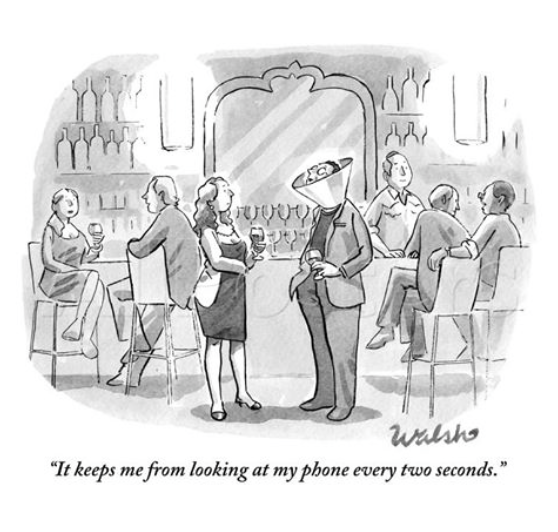
Coming from a technology background, I’m not immune from the social behavior that will be discussed in this article. In fact, I have exhibited many of these behaviors over the past eight years since the smartphone was born (the iPhone and the film “Ratatouille” were both introduced on June 29, 2007), so I can relate to the misuse and over use of technology in social situations. I have seen hundreds of new computers and devices come and go over the past 40 years, but none of them have created the technology pull that smartphones have in such a short period of time. So, what’s wrong with the smartphone? Nothing. Is it really smart? Yes, but sometimes we aren’t. The problem is not the smartphone. It is having the phone with us at all times when we really need to give each other our full attention.

THE ORIGIN OF PHUBBING

On May 22, 2012 at the University of Sydney, Australia, a group of language experts (a lexogologist, a phonetician, a debating champion, a poet, several authors and a cruciverbalist) gathered together to create a word that would get people to put their phones down and get talking to each other again. The word “phubbing”, which they created at 4:22 p.m. that day quickly spread throughout the world, attracting the attention of over 300 million people in over 180 countries. It began to prompt discussions about smartphone etiquette and the truth that so many of us are frustrated by the behavior caused by the proliferation and use of smartphones in social situations. Without a word or term to describe this social behavior, it had gone unchecked since the beginning of the smartphone era. This anti-phubbing campaign was intended to deliver the message that “phubbing is a social scourge and people of all ages, all nationalities and either sex, offend at some point.”

RECLAIMING CONVERSATION

In her new book, Reclaiming Conversation, the Power of Talk in a Digital Age, clinical and developmental psychologist Sherry Turkle, professor of social studies of science at MIT, examines how smartphones and social media have crowded out real conversation. She says, “human relationships are rich, messy, and demanding. When we clean them up with technology, we move from conversation to the efficiencies of mere connection.” Professor Turkle lists the three promises our smartphones make us, (1) we’ll never have to be alone, (2) we’ll always be heard, and (3) we can put our attention wherever we want to be so we’ll never have to be bored.”

Turkle goes on to explain the importance of conversation and the development of empathy. The valuable elements in face-to-face conversations are (1) you don’t edit yourself, (2) you are spontaneous, and (3) you let yourself be vulnerable. In face-to-face conversations, empathy is born, collaboration hardens and close connection happens

We have become so vulnerable to the seduction of who wants to reach us, that we turn away from our face-to-face conversations with family and friends in exchange for the neuro chemical hit of constant connection we receive from the next text message or event notification.

We increasingly miss out on the important moments of our lives as we look down at our iPhones, archiving our life through text messages, Facebook and SnapChat and shielding ourselves from the outside world with the false sense of connection our smartphones provide us.

SOCIAL IMPACT STATISTICS

87% of teens would rather communicate via text than face-to-face.

89% of adults in their last face-to-face interaction pulled out a smartphone, and

82% said that it deteriorated the quality of the conversation.

77% of smartphone users reported that they turn to their phone to avoid being bored

93% (18-29 year olds)

82% (30-49 year olds)

55% (50+ year olds)

58% of smartphone users don’t go one hour without checking their phones.

40% decline in empathy among college students in the last 20 years, most of it in the last 10 years

TECH CEO’S 

When Nick Bilton of the New York Times was interviewing Steve Jobs in late 2010, he asked, “So, your kids must love the iPad?” and Jobs answered, “They haven’t used it. We limit how much technology our kids use at home.” Chris Anderson, the former editor of Wired magazine, has instituted time limits and parental controls on every device in his home because he has seen the dangers of technology firsthand (exposure to harmful content, bullying from other kids and becoming addicted to their devices). Evan Williams, a founder of Blogger, Twitter and Medium says that in lieu of iPads, his young boys have hundreds of books that they can pick up and read anytime. These tech CEO’s seem to know something that most of us don’t, and they all agree on this one universal rule: “There are on screens in the bedroom. Period. Ever.”

UNPLUGGING

Zachary First, senior managing director of the Drucker Institute, believes that there are tremendous benefits of unplugging from technology. In his April 8, 2015 article in the Harvard Business Review, he states that “a growing body of neuroscience research reveals the exact ways in which technologies cut against the natural grain of the human mind. Our understanding of all kinds of information is shaped by our physical interaction with that information. When you move from paper to screen, your brain loses valuable topographical markers for memory and insight. In short, when you want to improve how well you remember, understand and make sense of crucial information, sometimes it’s best to put down the tablet and pick up a pencil.” 

If you are so inclined to participate, the National Day of Unplugging, a project of Reboot, takes place on the first Friday of the month, and this year will begin on March 4th. 

TECHNOLOGY SHABBATS

Tiffany Shlain, the founder of the Webby Awards and acclaimed filmmaker from Marin County, believes that technology is clearly changing us and the way we connect with our friends and families and the world around us. So once a week from Friday sundown to Saturday sundown, she and her family take a “Technology Shabbat” and unplug from all of their technology. Shlain says that “unplugging for a day makes time slow down and makes me feel more present with my family. We try to be as unavailable as possible, except to each other and our children.

I not only appreciate this quality time with them, but it has also made me appreciate technology in a whole new way. By sundown on Saturday, we can’t wait to get back online. Still, every week we remember the most important thing about technology: It has an off switch.”

NOMOPHOBIA (No Mobile Phone Phobia) 

There is a new phobia centered around our relationship with the smartphone. This phobia occurs in situations when an individual experiences anxiety which is due to the fear of not having access to a mobile phone. This anxiety is provoked by several occurrences, such as the loss of a phone, loss of reception or a dead smartphone battery. If you experience this phobia during a technology shabbat, you may want to cut out early Saturday morning before anxiety overtakes you.

CONCLUSION

Is there a cure for the failing connections of this digital world? Yes, and we can start by:

•Taking and experiencing regular (weekly) technology time-outs. 

•Designating sacred areas in our home (kitchen, dining room, bedrooms) and car and keeping them phone-free. 

•Talking to each other, uninterrupted by technology or the threat of technology.